
Why your own copy is not optional
We take encrypted backups of every vault, replicated to a second Australian server. Those exist so that we can recover our own infrastructure from a failed disk or an operator mistake.
They are not a copy of your passwords that anyone can hand you, and that is by design. Your vault is encrypted with keys derived from master passwords we never receive, so nothing in our backups can be read, searched or partly restored by us. If your entire business lost every master password tomorrow, our backups would be a pile of encrypted bytes to everybody, us included.
This split is in your Terms of Service, and it works both ways. Keeping the platform alive is our job. Holding a usable copy of your own data is yours. We would rather say that plainly on a help page than bury it in clause 14 and surprise you later.
An export also covers the boring, likelier situations:
- Someone deletes a collection they should not have.
- You want to prove to an auditor or an insurer what access existed and when.
- You decide to leave us, which you are entitled to do, with your data.
Which format to choose
The export screen offers several. The choice matters more than it looks, because one of the encrypted options is useless as a disaster backup.
| Format | Use it |
|---|---|
| .json encrypted, password protected | Yes, this one. You set a file password. Anyone with the file and that password can restore it into any vault, which is exactly what a backup is for. |
| .json encrypted, account restricted | No. It can only ever be imported back into the same account that made it. If that account is the thing you lost, the backup is worthless. |
| .json plain text | Only for a quick inspection, deleted immediately. It is every password readable in a text file. |
| .csv plain text | Same warning. Useful if you are moving to another system that only reads csv. |
The file password is a second unrecoverable secret. Make it strong, make it different from your master password, and store it separately from the file itself. A backup and its password in the same drawer is one theft away from being an incident.
Export your organisation vault
You need to be an owner or an admin. Do it in a browser: the export screen is not in the phone app.
Sign in to the web vault
https://acme.vault.businessops.com.auSelect Tools, then Export
In Export from, choose your organisation, not My vault
This is the step to get right. Exporting your personal vault backs up your own items and none of the business ones. If you want both, do two exports.
Choose .json (Encrypted), then Password protected
The screen offers two export types once you pick the encrypted format. Account restricted is the default and is the wrong one. Switch it to Password protected and set the file password.
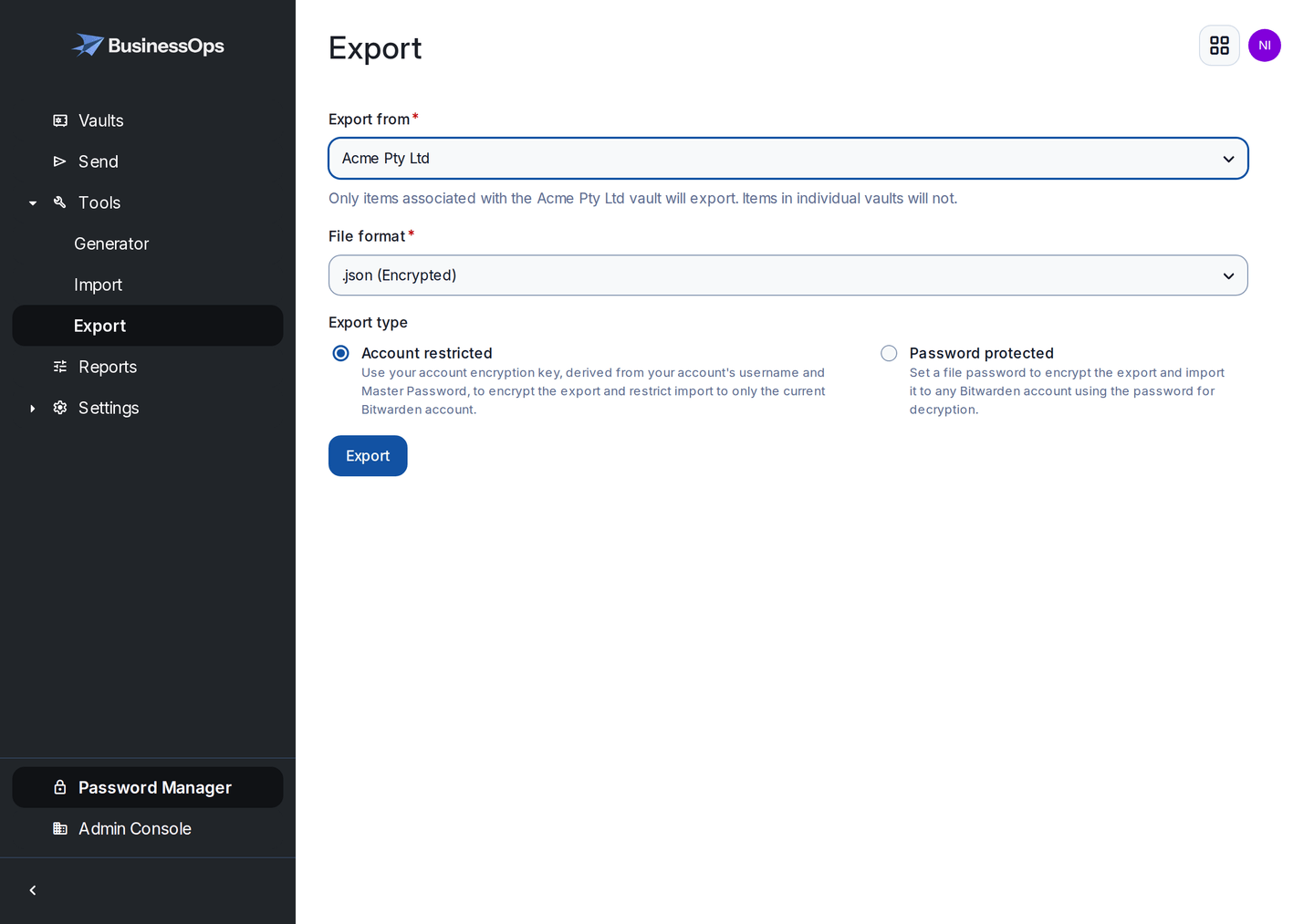
Export from is set to the organisation, not My vault. Note the warning that only organisation items will be exported. Confirm with your master password and download the file
Rename it with the date
Something like
acme-vault-2026-07-27.json. In two years you will be grateful you can tell which is current.
Attachments and Sends are not included. If you keep important files attached to vault items, download those separately and store them with the export. Everything else, logins, passwords, notes, website addresses and authenticator codes, is in the file.
Enter your vault name to personalise the steps on this page.
https://acme.vault.businessops.com.au Showing an example address. Enter your own vault name above to personalise these steps.
Check the export actually works
An untested backup is a hope, not a backup. This takes five minutes and you only need to do it properly the first time, then once a year.
Check the file is not empty
An encrypted export is unreadable, but it should still be a sensible size. A few kilobytes for hundreds of logins is a red flag, and so is a file of zero bytes.
Confirm you can still open it in six months
Write down, with the file, the exact format you chose and where the file password is kept. Future you will not remember.
Prove a restore, once
The honest test is importing the file somewhere and seeing your items appear. The safest way to do that without disturbing your live vault is to ask us for a temporary test vault. We will set one up at no charge, you restore into it, you confirm the count matches, and we destroy it. Businesses that have done this once sleep better.
Where to keep it
- Offline, on something you can hold. An encrypted USB drive in the safe, or with your other business continuity documents.
- Not only on the laptop that made it. The disaster you are protecting against usually takes the laptop with it.
- Not in the vault it came from. That is a circle, and circles do not survive lockouts.
- Not in email. Not even to yourself, not even briefly.
- If you must use cloud storage, use a business account with two-step login on it, and keep the file password somewhere else entirely.
Keep the last three, delete the rest. Old exports are old passwords, still readable, still sitting there. Every copy you keep is another place a breach could start, so retire them deliberately.
Make it a routine
The businesses that get burned are not the ones that never made a backup. They are the ones that made one in the first month and never again.
- Monthly for most small businesses. Put a repeating reminder in the calendar with a link to this page.
- After anything big: a bulk import, a staff departure, a round of password changes.
- Before you change anything structural, such as moving to your own domain or restructuring your collections.
Give the job to a person, not to the business. Name who does the export and who checks it was done. A task that belongs to everyone belongs to nobody, and that is how a year goes by.
Want us to check your first export?
Email hello@businessops.com.au and we will walk through it with you and set up a temporary vault to restore into. Never send us the export file or its password: the point of the exercise is that we cannot read your data.